
Free Final Cut Pro plugin: Alex 4D Grow-Shrink effect
This Final Cut Pro X effect animates a change in scale for a clip. It defaults to increasing the size of a clip by 5% over the lifetime of the clip. This kind of ‘creep in’ is useful for adding a little subliminal interest to stills and titles.
You can also choose a centre point for the scaling to happen around. This helps to zoom in on an interviewee, or zoom out from a specific part of the frame.
Here are the controls:
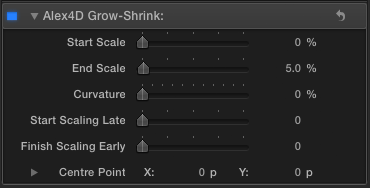
Start Scale and End Scale: The effect defaults to starting at 100% (Start Scale: 0%) and scaling up to 105% (End Scale: 5%). To scale from 110% to 75%, use Start Scale: 10% and End Scale: -25%.
Curvature: the shape of the animation curve. 0% will use the same speed to change scale throughout the clip. 100% will start to scale gradually, then scale at full speed and slow down towards the end of the clip. This simulates the way a camera operator would zoom in or zoom out of a clip.
Start Scaling Late and Start Scaling Early control for how much of the lifespan of the clip the scaling happens.
Centre Point: You can set this using an on-screen control
Using these controls:
The clip will scale from 150% of its normal size down to 50% of its normal size, the 100% curvature means it will start scaling slowly scale quickly and finish scaling slowly. The scaling will start after 10% of the duration of the clip on the timeline and finish at half the duration of the clip. The clip will scale around a point to the left and above the centre point of the clip:

Download the installer

If you find this free plugin useful, you might like my Alex4D Animation Transitions plugin pack:
Find out more about Alex4D Animation Transitions.
There are many more free plugins on my Final Cut Pro X page

 alex4D old blog
Oh my, this is a really neat, subtle and useful one :-)) THANKS alex. Brilliant !
Alex. Great job. Using this on finishing up a student feature. Used it hundreds of times. Incredible time saver.
This sounds great! Do you know a similar plugin for Fcp 7?
Sadly no.
It’s been so long that I’ve created any Final Cut Pro 7 effects it would take me too long to learn how to do make one for you.
Sorry!
Pingback: FCG003 – Reading the FCPX Tea Leaves (feat. Alex Gollner) | digitalCINEMAcafe
Pingback: FCG022 – Homegrown Plugins (feat. Alex Gollner) | digitalCINEMAcafe
how to download?
Click ‘the installer’ in the text ‘Download the installer’ above or Click the ‘Alex4D Grow-Shrink Installer.app’ installer icon.
Woohoo, Alex, I’m here in Aug 2018! Gonna download this from being inspired by Ryan Welborn’s recent tweet that he uses this plug-in. 🙂
Hmmm not seeing it in FCPX after it says it was successfully installed. Probably not compatible with High Sierra 10.13.5, FCPX 10.4.3?
Works fine on macOS 10.14.5 & FCPX 10.4.6. Shows up under Effects, and once dragged on an image, controls appear in Video Inspector.
This is the most important 3rd party Plug In for fcpx period. Apple should buy this for a couple of (10) thousand dollars and integrate it asap. :))